
iBonus Android POS terminal – Loyalty Card Solutions
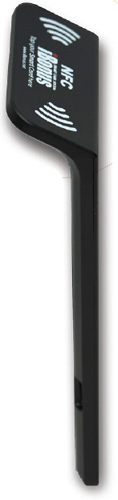
iBonus Android terminal is a smart gadget (Android POS terminal) used for loyalty card solutions. It works as a loyalty terminal once the application license is installed on it. It’s introduction in the market will bring in a user-friendly technology as per the current trends.
We at iBonus have developed a customized tablet (Android POS terminal)with iBonus loyalty application installed for Loyalty Card Solutions. It is a Android POS terminal that also doubles up as a loyalty terminal. The iBonus Android Terminal gives you an advanced level of comfort as compared to a typical POS that is fixed and stationary, as it is portable and can be carried anywhere. That in turn reduces the cost and eliminates the need of maintaining a huge backend server.
The terminal reads the smart card, and the last point balance is stored on the card itself. The terminal can store 5000 records on offline mode (so it is functional even if data connectivity is lost), and the data gets pushed to the cloud server since everything is cloud based. This intelligent, smart payment terminal can also be integrated with your existing POS for which we provide all necessary backend support.
BASIC REPORTING
The terminal also provides Reporting functions like customer profile, time of purchase, frequency of purchases done. An administrator can make a query on the iBonus Database by applying filters and grouping on member info, branch, terminal and transaction type. All results obtained can be exported to Microsoft Excel .csv file for further analysis.
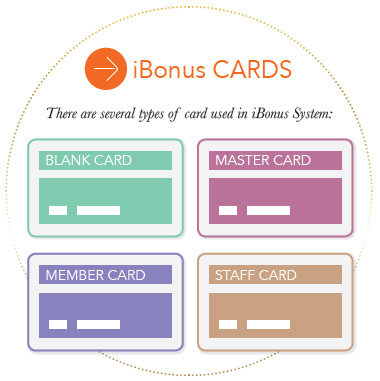
BLANK CARD
Blank card is the Mifare card newly bought without being marked by any Mifare devices.
MASTER CARD
Master Card has the following purposes:
- » To ensure unique allocation of Member Card ID’s
- » To ensure the Terminals of different end users can only read cards issued by them.
- » To define maximum prepaid value for member cards.
- » To define sector usage for member cards and staff cards
- » To identify whether Integer Mode or Decimal Mode to be used
MEMBER CARDS
A member card is a contactless smartcard with the size of a credit card. Integrated within the card is a built-in memory for storing the most up-to-date bonus points, prepaid dollar value and 1:1 administrator-defined member profile. Utilizing 13.56Mhz radio frequency smartcard technology, the transfer of data between smartcard and Terminal or Display unit requires no physical contact.
Essential features
Since the most current information about the members are stored on the Member Cards, this reduces the dependency of real-time information from the centralized database server, as in the case of the traditional magnetic strip card loyalty solutions. Two types of Member Cards are used:
- (a) Ultralight Card with less memory (48 bytes) and lower security for loyalty card solutions (single redemption item stored)
- (b) Classic Card with more memory (15 sectors of 48 bytes each) and high security (Triple Des) for both loyalty payment card solutions and prepaid subsystem.
- Basic information (48 bytes) format stored in both Ultralight and Classic cards:
- » Unique card ID (4 bytes) assigned using the Master Card supplied from the factory.
- » Current bonus points (3 bytes, Max.point = 16,777,215)
- » Unique Company Code (2 bytes) assigned using the Master Card for a company’s identity. Accumulative bonus points (4 bytes, Max.point = 4,294,967,295)
- » Last Member name (10 characters) Redemption or Purchase item name (10 characters) Administrator-defined member profile (12 bits combination of questions and choices) Identifier for Item Name (1 Character) Date of birth
- » Redemption point or Purchase Value (3 bytes, Max. point = 16,777,215 or max. value =167,772.00 with 2 decimal places)
- Language selection (4 choices)
- Current prepaid dollar value (3 bytes, Max. value = 167,772.00 with 2 decimal places)
- Member Card expiry date
A Master Card is first generated to assign a Company Code and a range of unique new Member Card ids. The Company Code is used to identify and is exclusive to every client.
The terminals at every outlet are fed with the Master card details and can then read a Member Card easily. A member card with a different company code will just not be recognized at the terminals.
iBonus Terminal provides advanced card handling function, this eliminates the need for a separate card control unit or center and a subsequent savings on cost.
STAFF CARDS
Staff Card is essentially a conversion of a Brand New Card (Newly formatted card) to a Staff Card. Staff Card login is required for the Terminal to accept the Member Card operations such as addition and deduction of bonus points. Staff Card logout is recommended when the staff is not attending the Terminal. Staff login and logout actions are recorded as transactions in the pos terminal, and they provide trails for auditing purposes
Doing Card Transactions
iBonus Terminal provides generic transaction types for performing calculations of stored values such as Purchase, Reload, Bonus Point Addition and Redemption. The behavior of all transactions types are consistent with the combinations of card status, system setting and system status, like decryption keys, expiry settings, decimal mode, bonus rate, blacklist, card sector usage, card value limits. iBonus Terminal also eliminates the need of redeveloping the sophisticated algorithm behind, and makes it easy for anyone who is new to smart card systems to quickly deploy a payment loyalty card solutions.
Advanced Card handling
Advanced Card handling iBonus NFC Android Terminal provides advanced card handling function that allows card expiry date extensions (Card Renewals), Lost card replacement and Corrupted card repair at Terminals of any location. This eliminates the need for a separate card control unit or center and subsequent savings on cost.
Sending Transactions back to iBonus Server
After completion of every transaction, such as adding bonus points, redemptions, staff login, the transaction record is stored in the Terminal’s transaction queue that has close to 5,000 buffers. The records in the transaction queue are sent to the server as soon as the network connection is ready. The terminal stops accepting transactions when the queue is full.
Receipt Reprint and Auto Reprint
A receipt is printed for any transaction made if a printer is connected to the pos terminal. To take a reprint of the receipt, press the button A. If Auto Reprint is kept ‘on’, two receipts will be automatically printed for every transaction.
Connects to Bank POS System (Cash Machines)
iBonus Bank POS system unifies the smart pos terminal. All the transaction types on the iBonus pos Terminal are accessible by POS through RS 232 -serial port. Equipped with a ready made Windows-based API, all the generic transactions, and advanced card handling functions can be accessed with utmost ease. Also, with the help of distinctive member card and staff card readable functions, the POS itself can command the most suitable transactions.

THE iBonus BACK-END SERVER ENGINE

The iBonus Server is a comprehensive multilingual Windows-based CRM software tool. It collects transaction records from Terminals and stores them in ODBC database format. Also provides an SQL report tool to generate results and reports based on different criteria: filter, grouping, and sorting.
iBonus Server does not require a processor of high speeds or high data usage as there is no real-time query between the Server and the Terminals. The advantage of which is that it can be installed on any Windows desktop computer.
iBonus Server can collect records from Loyalty Terminals as well as Prepaid Terminals.
Grouping in the case, is used to generate reports or summaries according to Reload $, Undo reload, Card purchases, Undo card purchase or Net $ Balance (which
equals to Reload – Undo reload-Card purchase +Undo Card purchase).
Reports generated by grouping branch codes will reflect the income generated at different branches.
Different Terminals in different branches are identified by the difference in their branch code. Different Terminals within the same branch have the same branch code but different terminal code. Both branch code and terminal code range from 1 to 9999. The connection between a Server and the Terminal can be established as long as the Terminal can ping the Server. The data is sent through the Internet, and the terminal is set to have local IP, no additional NAT or port forwarding is needed for the Terminals.
SYSTEM REQUIREMENTS
Recommended System Specification
As the iBonus Server is not required to handle real-time responses regularly, the system has little requirements of network connections and server hardware.
SERVER
For a System with up to 50,000 members, iBonus Server can be run without a Microsoft SQL Server 2005. iBonus Server can make use of the built-in Microsoft SQL Server Express 2005 for data storage. For any system with customer base larger than that,
Microsoft SQL Server 2005 should be deployed.The following is the recommended specification of the server platform for a system with up to 1,00,000 members.
| CPU: | Intel duo core 2GHz or above |
| RAM: | DDR1 2G byte or above |
| Hard Disk: | 80GB or above |
| Operating System Reports: | Does not require iBonus Web Reports: Windows 7 Home, Windows XP Home, Windows Server 2003, Windows Vista Home |
| Microsoft SQL Server: | <50,000 Member, optional +50,000 Member, recommended |
| Network Card: | 100Mbps network card |
BASIC FEATURES OF SQL REPORT TOOL
The range of records can be selected based on different filters. For e.g., taking into account the criteria of Time, one can set the filter to a particular date, a period of day and time, this week, last week, this month, or last month.
MEMBER ID
Terminal Action Type: There are different actions regarding the operation of the Terminal, such as presenting Master Card, Staff logout and Card Purchase. Each action has an internal code associated with it: Member Information: Administrator requires first to upload the Member profile definition before using this filter
The filtered records can also be saved in CSV format for further working on the data with Excel if needed. Example of record fields stored in CSV format:
- » rcdid: Record ID
- » ItemBonus: the bonus value of the redeemed item
- » ID: Card ID
- » BalBonus: Current Bonus Point Balance of the Member Card
- » Name: Member Name (10 characters)
- » AccBonus: Accumulated Bonus Points of the Member Card
- » DOB: Date of birth Staff ID (4 bytes)
- » Expiry date: Member Expiry Date
- » Terminal Code (4 characters)
- » LogdateTime: Record date and time
- » CompanyCode (2 bytes)
- » Logdate: Record date Branch Code (4 characters)
- » Type: Terminal action
- » CardSN: card serial number
- » Description: Item Description
- » BalPrepaid: Prepaid Value of the Member Card
- » Amount: Cash/Card Purchase, Reload
- » Member ID (20 characters)
A summary of Cash Purchase, Redemption, Undo Purchase and Net Bonus Balance (which is equal to Cash Purchase -Redemption – Undo Purchase) can be grouped and sorted by following fields:
- » Time: This will generate daily transactions summary required for all accounting needs.
- » Branch code: This group can help to summarize transactions at each location.
- » Card ID: This can be used to summarize the activities of each Member by it’s Card ID.
- » Member ID: This can be used to summarize the activities of each Member by it’s Member ID.
- » Item Description: This can help to identify popular redemption items or products. Also helpful for tracking inventory.
- » Staff ID: This grouping is useful for staff operation auditing.
- » Age
| TECHNICAL SPECIFICATION |
| Windows 7/10, Windows Server 2012/ 2014 |
| SQL reporting |
| C Language |
| Data output to CSV format |
| ODBC database format |